
Excel vs WMS for Warehouse Management
Compare spreadsheets and WMS workflows by team access and location control. Decide when Excel is enough and when to evaluate a dedicated system.
Excel helps teams start recording inventory quickly. A WMS offers structured warehouse transactions. Choose based on the process and data ownership and shared-work requirements.
Compare the same requirements
- Setup: spreadsheets are flexible; a WMS requires configuration and master data.
- Teamwork: shared files need editing rules; WMS roles and approvals depend on the product.
- Traceability: spreadsheets require a maintained transaction format; a WMS may provide source documents and audit history.
- Locations: both approaches need explicit location records; WMS transfer support varies.
- Integration: spreadsheet imports or automation and WMS APIs each require a defined scope.
Verify required capabilities during a demonstration. A feature label alone does not establish how a product handles your workflow.
When a spreadsheet is sufficient
A single owner with straightforward transactions and regular reconciliation may work effectively with a clear workbook. Keep one authoritative file. Protect formulas and avoid conflicting copies.
The free Nodic workbook separates stocktakes from stock cards. Use one stock card per SKU and location. A transfer out of one location must be recorded as a receipt at the destination.
When to evaluate a WMS
Evaluate a dedicated system when shared transaction entry and access controls or traceability become persistent problems. Order integrations and lot or serial tracking can add complexity. A more elaborate dashboard does not by itself solve those needs.
Estimate handling costs transparently
Dummy example: 1,000 monthly orders × 2% incident rate × IDR50,000 per incident = IDR1,000,000 monthly handling cost. This is neither a measured business loss nor guaranteed WMS savings.
Replace these assumptions in the order-error calculator. Avoid counting a cost twice. Evaluate implementation and training costs separately.
Compare using identical transactions
Run a receipt and transfer and shipment through each approach. Ask operators to explain the ending balance and stock location. Include returns and cancellations when assessing a production system.
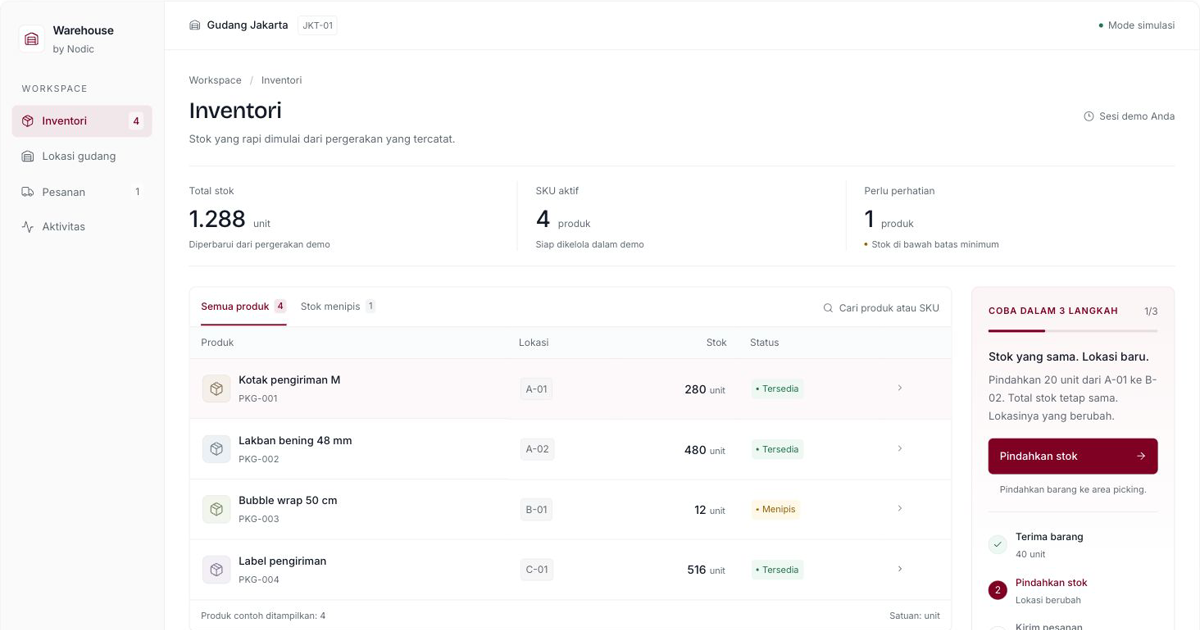
The Nodic WMS demo starts at 240 units. Receive 40 to reach 280. Move 20 while retaining 280 total. Ship 30 to finish at 250. All values are sample data.
Before changing systems, use the inventory migration checklist to plan data preparation and reconciliation.